my version of transparent, collaborative leadership...with a Teamann twist

  • About
  • Speaking & Consulting
  • Books
  • Hear & See

#r10tech: Don’t let being connected be an option!

May 7, 2014 by Amber Leave a Comment

This is the presentation being shared at the Region X Technology Conference.


For your convenience…

Be more dog: https://www.youtube.com/watch?v=iMzgl0nFj3s

Girls first ski jump: https://www.youtube.com/watch?v=ebtGRvP3ILg

Principal Meltdown: https://www.youtube.com/watch?v=dDASxk5kiDw


Thanks for coming to my session, or looking into the resources! 🙂


sharing is nice,

Amber


Filed Under: Uncategorized

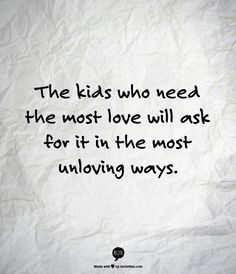
What do you do for the unloved? Be a LOVE NINJA!

February 2, 2014 by Amber 3 Comments

In every classroom there are students who don’t quite fit in. They may be more mature than their peers, or less mature than their peers.

They may dress differently.

They may learn differently.

They may laugh differently.


Sometimes they may BEHAVE differently. 

2fa7b5a23862321e48df6a5eca2b08c9

It doesn’t take much a for a student to ostracize themself from their peers. How do you foster relationships? How do you help students with social skills? Students without siblings, or in a new environment may need some additional support. A former co-worker I had used to do “Lunch Bunches” where once a month she’d bring in students that needed social skill help along with  some of the more established students, and try to develop relationships.

I saw an article posted on Facebook from a friend. It was such a great example of how important dealing with some of these ostracized students can be, and why as a teacher, it should be on your radar too.

Every Friday afternoon C’s teacher asks her students to take out a piece of paper and write down the names of four children with whom they’d like to sit the following week. The children know that these requests may or may not be honored. She also asks the students to nominate one student whom they believe has been an exceptional classroom citizen that week. All ballots are privately submitted to her. And every single Friday afternoon, after the students go home, C’s teacher takes out those slips of paper, places them in front of her and studies them. She looks for patterns.

Who is not getting requested by anyone else?

Who doesn’t even know who to request?

Who never gets noticed enough to be nominated?

Who had a million friends last week and none this week?

You see, C’s teacher is not looking for a new seating chart or “exceptional citizens.” C’s teacher is looking for lonely children. She’s looking for children who are struggling to connect with other children. She’s identifying the little ones who are falling through the cracks of the class’s social life. She is discovering whose gifts are going unnoticed by their peers. And she’s pinning down- right away- who’s being bullied and who is doing the bullying.

You can read the whole article here. (She also talked about what a “Love Ninja” this teacher was, which has given me a whole new goal in life. I want to be a LOVE NINJA!) There are students who truly need our help to be connected. They need to know how to be a friend in order to have a friend. I shared with a teacher this week how absolutely eye-opening it was for me in high school when a boy I wanted to ask to a Sadie’s Hawkins dance told my friend that I was “too immature” for him. It was such a self actualization moment for me….I had no idea. Students can be completely unaware of how they are coming across to their peers and it  falls to us to help them see.

Look at your classroom…or your staff, this week. Are there connections to be made? Is someone slipping through the cracks? I challenge you to help make the unlovable feel loved. 


Love ninjaN,

Amber


Filed Under: Uncategorized Tagged With: #admin, #beintentional, #cpchat, #edchat, #students, #teachers, #txed

The handwritten note…going old school in 2014!

January 2, 2014 by Amber 3 Comments

Screenshot 2014-01-02 17.15.15In the fast paced day to day-ness of our world, it is easy to take the easy route of telling some one that they did a great job, or that you appreciate what they’ve done for your campus.

The words are always welcome.  However, there is nothing as powerful as tangible words on the page.  I’ve appreciated and saved emails, but inevitably they are deleted. (darn space constraints!) Compare that with handwritten notes.  I have kept almost all that I’ve received…from as far back as college! There is just something about the time and effort that it takes to write a note…just seems more thoughtful than a tweet or an email. It’s personal. It’s private, intended to be seem by you, the writer, and them, the receiver.

I know it may seem odd for someone with degree in technology who blogs on its impact in her life on  to encourage the writing of actual ink-on-paper notes…but truly, it makes a difference. It’s free. It’s valuable. It’s something I commit to doing more of in 2014!

Luckily, the genius of Melina Miller (@mmiler7571) even helped me figure how I can make it happen. When I was a teacher, I made a check list of all my students names and tracked the positive parent contact I made each semester. I mailed/sent home a minimum of 3 happy notes per child, per semester. The relationships that were built on that alone were priceless. It also guaranteed I didn’t forget someone or send too many “easy” notes. Keeping a checklist meant I kept it consistent.

At my previous campus, I used these to give shout outs, but never seemed to do it as consistently.

Screenshot 2014-01-02 16.57.06

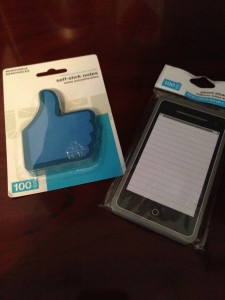
Melinda uses self stick notes that I also scored at Walmart for a $1 (woot woot!). Perfectly sized for a genuine, happy, note of appreciation. The fact that they are techie themed is just happiness to my heart! But still, how could I guarantee I didn’t miss someone?


2014-01-02 16.18.29

Why change what had worked in the past? In my Erin Condren planner I made a checklist of all my teachers with the months left for the semester and will check them off each month. 2014-01-02 16.34.01The handwritten note in a world full of different ways to communicate may seem like a lost art. According to the U.S. Postal Service’s annual survey, the average home only received a personal letter once every seven weeks in 2010, down from once every two weeks in 1987. And The Wall Street Journal recently lamented the “lost art of the handwritten note.” As an added bonus, studies show that those who express gratitude also benefit by experiencing better health and sleep, less anxiety, and more life satisfaction. They benefit giver and receiver alike. And…to my pocket weary educators…they’re free! (Well, unless you need cuter notes…then they it’ll cost ya!)


Write on!

Amber

Filed Under: Leadership, Other, Uncategorized

5 Key Strategies for ELL Instruction

October 30, 2013 by Amber Leave a Comment

5 Key Strategies for ELL Instruction

By Rebecca Greene

 (This article was orginally  published in an ASCD brief. Ms. Greene’s contributions have the voice of a teacher, which are powerful! )

English Language Learners (ELLs) face the double challenge of learning academic content as well as the language in which it is presented. Teachers have traditionally treated language learning as a process of imparting words and structures or rules to students, separate from the process of teaching content knowledge. This approach has left ELLs especially unprepared to work with the complex texts and the academic types of language that are required to engage in content area practices, such as solving word problems in Mathematics, or deconstructing an author’s reasoning and evidence in English Language Arts. ELLs need to be given frequent, extended opportunities to speak about content material and work through complex texts in English with small groups of classmates.

The new, widely-adopted Common Core State Standards and Next Generation Science Standards also call for all students, including ELLs, to master an array of academic language practices that are critical to achievement in content areas. Examples of these academic language practices include: argument from evidence, analysis of complex texts, and developing and using models. At Stanford’s Understanding Language, we have found that ELLs benefit from instructional approaches that treat language and content in an integrated way that is designed to help them build the language skills that they need to succeed in content classrooms, college and careers.


Working closely with Denver Public Schools teachers Ms. Emily Park-Friend (Bruce Randolph School) and Ms. Katie Langlois (Morey Middle School), we’re glad we can show through this video series ways that these 7th grade ELA teachers prepare their learners by activating prior knowledge, scaffolding meaning making with complex texts, and developing ELLs’ discipline and academic language practices in ELA classrooms.

ELL Lesson Overview

The set of six video clips begin with this short overview by Understanding Language ELA work group members George Bunch (University of California, Santa Cruz) and Aída Walqui (WestEd). This overview video discusses the key shifts found in the Common Core for ELLs and the opportunities for ELLs to grow their disciplinary knowledge and English language skills in heterogeneous classrooms. Through the classroom videos, we see several key strategies for encouraging English Language Development:

Scaffolding Understanding

The classroom video series highlight how ELA teachers can take account of the language demands that ELLs face in content classrooms and help ELLs meet these demands with increasing autonomy over time. As discussed in this video, this means providing ELLs with strategic types of scaffolding, such as graphic organizers, visual aids, peer help, or home language help, and removing these supports as students’ skills develop. This way, ELLs can be given the opportunity and the necessary support to meet rigorous academic standards.

Purposeful Grouping

Heterogeneous Classrooms

Also, as this video explains, ELLs learn best when they are in heterogeneous classrooms. ELLs need to be given ample opportunities to have extended interaction (such as doing ‘jigsaw’-type activities) with peers of varying English proficiency levels, who can provide ELLs with a range of models for how to use English words or structures appropriately, as well as abundant, personalized feedback on ELLs’ own developing English use. It is best for ELLs if, within their classrooms, teachers sometimes group students heterogeneously according to English proficiency, and sometimes homogeneously, depending on the purpose of the task at hand.

Background Knowledge

Another teaching technique (demonstrated here) that is beneficial for ELLs, is to provide them with relevant background knowledge about a topic to be discussed in class, or activate their existing knowledge of a topic. Besides increasing student interest, this allows students to focus more fully on the instructional goals, rather than being overwhelmed with too much new information at once. It also allows ELLs to bridge new knowledge to old knowledge, increasing understanding, and it helps some ELLs fill in contextual information (such as American political history or cultural details) that they may not have due to coming from different cultural backgrounds.

Extended Discussion

Extended Discussion

Though teachers have generally attempted to teach ELLs difficult vocabulary before having them read texts, ELLs learn new vocabulary best through extended discussion with their classmates after reading or between multiple readings, as this video explains.

Valuing Linguistic Differences

Schools and teachers can help ELLs greatly by learning about ELLs’ home cultures and languages, treating cultural and linguistic differences as resources rather than obstacles, and reaching out to students’ homes and communities to build learning opportunities together.

Here are more resources for teachers and administrators who are seeking to better support ELLs:

  • Understanding Language ELA and Mathematics resources
  • Understanding Language Key Principles for ELL Instruction
  • Framework for English Language Proficiency Development Standards corresponding to the Common Core State Standards and the Next Generation Science Standards

Rebecca Greene has a Ph.D. in Linguistics, specializing in Sociolinguistics, from Stanford University, and a Certificate in Teaching English as a Second Language from the University of Kentucky. She has extensive and varied experience as an instructor. Most recently she taught Language and Culture at California State University-East Bay. She has been working as a consultant with Understanding Language for two years. She also works as a Senior Research Assistant for Stanford University and for NORC at the University of Chicago.

Understanding Language aims to heighten educator awareness of the critical role that language plays in the new Common Core State Standards and Next Generation Science Standards, and to improve education for English Language Learners.

Filed Under: Uncategorized

How using Dropbox changed my life!

October 14, 2013 by Amber 2 Comments

I know that sounds a lil’extreme, but seriously, it did.


Dropbox is a storing/sharing place in the cloud that allows you to keep up with all of your files,where ever you are, even across platforms. I love this blurb I came across:

“This program acts as a “magic pocket” which is always with you and contains whatever you place in it. Put a file into your Dropbox and it’s on all of your computers and mobile devices.”

Who doesn’t want a magic pocket?  The genius of this for me is that I use a number of different devices for a number of different things. I take pictures on my phone, I take notes on  my iPad, I do appraisals on my Mac, and then will write a blog post on my home PC that needs ALL of those things. Having a place that I can easily access ALL of my “stuff” is crucial for the efficacy of what I do throughout the day.

How to get started/going?

  1. Step one: Go to Dropbox and set up an account. I just use the free one because with as many times as I downloaded it, I got a couple free GB just for multiple downloads. Next, download and install the Dropbox app. Put files and folders that you need to access from various locations and devices into your new Dropbox folder. Then repeat these steps on your other Mac,  PCs, and iOS devices.  (Again for me, that was two ipads, a phone, two PC’s, and my macbook.
  2. The account that you create  automatically includes a Dropbox folder  and it shares files with any other devices that have Dropbox and are connected to your account. (PS: you don’t HAVE to download it, but it does make life easier. Anytime I’m working with a file I know I’m going to need later, I just toggle and save in my “Dropbox” folder so I can get to it later.
  3. dropbox1
  4. Now, anytime, you go to SAVE something, you have the ability to add it to your Dropbox. Easy peasy, I tell ya!
  5. Many of us store the files and folders for active projects on the desktop. Put them in Dropbox instead. On your phone and take a pic? Click the + sign on your app and choose what pics you want to add to your Dropbox. It will then be available from any of your devices. Working online? Fabulous! The “files” tab on the website will bring you to your Dropbox folder. This folder is exactly the same as the folder on your devices; any files that you’ve placed into your folder on your computers are accessible through this part of the web site.
  6. Want to share files? BIG Files that you couldn’t send via email without crashing the world wide web? Presentations for parents? Set up separate folders in Dropbox’s Public folder for different people, and then send the separate URLs to each. Or set up a different shared folder for each project, and then distribute that URL to all project participants.
  7. Want to share  amazing classroom pictures, but not make them “public public”? Copy photos to Dropbox, and share the URL with family and friends. (I’m going to use this for our family involvement activity next month!)
  8. Feeling adventuresome? 62 things you can do with Dropbox suggests this: Go to the Send to Dropbox Website (sendtodropbox.com), click on Connect To Dropbox, and provide your Dropbox credentials. You can now email files to Dropbox. That makes all sorts of scenarios possible. For example, create a document in Google Docs and then opt to share it. In the Share drop-down menu, select Email As Attachment and provide your Send to Dropbox email address; the Google Doc will appear in Dropbox’s Attachments folder.” (WHOA BABY!)


It’s a very intuitive tool to use and following through some of the getting started tasks easily explains it as well as earns you more “free” space, 🙂 Nothing to lose there!

More Dropbox links to help ya out:

Dropbox for Teachers

Using Dropbox

Everybody loves a good LiveBinder, 😉


File saveN,

AmDrop


Filed Under: Classroom Integration, Data, Dropbox, Staff Development, teacher leader, Uncategorized Tagged With: #admin, #beintentional #classroom, #classroom, #cpchat, #students, #teachers, freebie, technology

  • « Previous Page
  • 1
  • …
  • 9
  • 10
  • 11
  • 12
  • 13
  • …
  • 16
  • Next Page »
  • Email
  • Instagram
  • LinkedIn
  • Pinterest
  • Twitter

Categories

Looking for something?

Featured Posts

Using AI like a leader, not a search engine

Hot take for 2026: If you’re frustrated with AI results, it’s probably not the tool. It’s the way we’re asking it to … [Read More...]

Walkabout Wednesdays: The moment you realize a principal is running your tech team…

One of the first conversations I had when taking this position five years ago was with our newly hired network engineer. … [Read More...]

Archives

Topics

#admin #ASCD #ascd13 #beintentional #beintentional #classroom #buckets #classroom #communication #cpchat #cpchat #txed #admin #edcampDallas #edchat #free #iste13 #math #parents #pbl #stations #students #taketwo #teachers #thefirstyear #tichat #twitter #txed #vision #WMST amber teamann AmberTeamann Building Relationships digital citizenship educational leadership freebie Leadership Challenges Leadership Development leadership lessons learning from mistakes personal growth professional development Professional Growth Reading social media Taylor Swift Taylor Swift Lyrics technology

Subscribe

Enter your email address to subscribe and I'll send you my social media and leadership starter kit as a thank you!

© 2026 · Technically Yours Teamann · Design by Albemarle PR